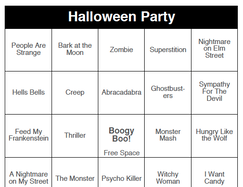
 You might not be surprised, but the most popular option for your party games this year is also the easiest... "Halloween Party" Music dobOFF. After purchase and downloading the document to your desktop, print off as many sheets as you require for your guests at the party. The document can print up to 60 (Edit: now every game comes with 250 randomised card per pack). randomized cards at a time, if you have more than 60 guests that you'd like to play in a round, just ask for a larger quantity, and a Fat City representative will generate one for you exactly how many you require. This is included in the price. Each page is set to "Landscape" layout, with 2 bingo cards per letter-sized sheet. You can always cut the sheet in two pieces with a pair of scissors or a paper cutter to split into individual sheets. Some hosts prefer to give guests 2 cards at a time. We always recommend handing out Bingo Dobbers such as these: https://www.amazon.com/DAB-INK-3oz-Bingo-Daubers/dp/B01C4QBW3G Printing on bright colored paper is always a bonus. I think the 60lb cardstock may be the best: https://www.amazon.com/Neenah-80944-01-Astrobrights-Colored-Cardstock/dp/B01LX0UJBN Don't forget to follow the playlist: Spotify - Amazon Prime - Apple Music Hit "shuffle" or make your own DJ order in the Queue. Bring lots of Halloween themed prizes and some good energy. Maybe try an "H" for a bingo somewhere along the way. There you go. You're all set! Powerpoint Halloween Themed Trivia Presentation After purchase and download of Fat Bottom Trivia "Halloween Party", you will need to connect to a big screen. Use an HDMI cable or wireless connection as described above.
Open the powerpoint file (you will need to have installed Microsoft Powerpoint or an equivalent presentation program. Use "presenter mode" so you can see any host notes, as well as seeing the next screen during the presentation. This will allow you or your host to know and check the answers from the crowd. Be prepared for hidden side-games to appear. Allow teams that answered correctly last round to choose the next category. Make sure to keep track of points on a sheet of paper. And promote having fun, and bonus points for dancing and singing along. Try a mini-challenge for the best "Team Cheer" or "Funniest Team Name". Game Buzzers are also a helpful addition: https://www.amazon.com/Learning-Resources-Lights-Buzzers-Classroom/dp/B00B2FNHB6
0 Comments

Septemeber 4th, 2019
Ahh, so much fun! I think you'll enjoy this game. Don't give away any answers too soon. They are all cover songs, so if you listen to the first intro, you may not have any recognition until the lyrics come out. A solid mix of remakes you thought were the original, and hidden gems of pop classics, you'd immediately recognize otherwise.
Follow the playists on Spotify, Amazon Prime, or Apple Music, hit shuffle, and have a blasty-blast!
Of course, we have the perfect bingo cards to match. Download & Print. Yours to use forever. Did we mention there is always friendly customer service around and ready to give you tips for your event? That's right, we're the best. So are you though too. Because you are sharing the love, promoting live entertainment, and bringing people together in your community. That's a cause we can get behind. Be sure to leave any questions, comments, or success stories in the comment section below. Peace, fellow entertainers! 2019 is turning out to be a great year for Live Entertainment, specifically, Music Bingo! The newest edition of music bingo card download & print games takes us around the world in only a single night. To be more specific, if you choose to go all the way to a blackout, and play the whole song every time, it would take 1 hour and 38 minutes. But I suggest from my experience that playing about 60-90 seconds or through the "meat" of the song works best to keep your guest's interest. I often start with "1st line any direction" for a Bingo, but not always. Sometimes I jump right to "1st ex or plus sign". Kind of depends on how many prizes I want to give away this game. If I only have one big prize to give away, I might go all the way to blackout, but there would be a chance 2 or more guests get one at the same time.. Also, remember that if you play ALL the songs.. Everyone has a Blackout! lol Make sure your prize box is full, in this case. Though I've actually played every song before too for smaller crowds to whom I wanted to give all a prize. And some people never came up to claim it because they didn't get all the songs. I try to go around and help players that might be struggling during songs too. I want people to get it right, and to enjoy themselves. As an entertainer, I know that my product is tiny pangs of excitement and serotonin coursing through their veins in an escalating fashion, often referred to as "a show". Haha 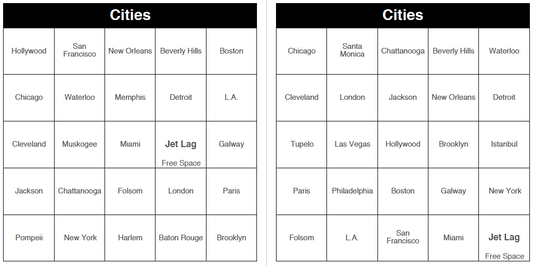 Cities it too much fun not to be a staple game for your gigs. All the big ones are here. "New York Groove", "Drinking in LA", even "Okie From Muskogee" made it in this playlist. Well, why don't I just show you: https://open.spotify.com/playlist/4zmM7eJaR8tz1VgZz1yHAY Got any fun stories or highlights from your event? Please share it below!
For quick responses to specific questions or to find a host near you, please email [email protected] Thanks for supporting live entertainment. Our Music dobOFF Bingo Games are now being hosted in several English speaking countries around the world. Are you ready to make your own bingo game? We just made it easier with our completely free bingo cards generator! Here's how you use it. Step 1: Come up with a theme and answers We start with the fun immediately! Come up with a title for your cards. This can be any subject of your choice! Here are a few fun ideas:
Then come up with questions and answers. You have to come up with at least 25. Remember, the more you put in, the harder it'll be to win the game! Step 2: Input the information Once you have your game all set start filling up the info on the generator. Separate the options with a comma. Don't forget to add a free space if you want one! Once you have all of them decide how many you want to print. Pro tip: always print a few more than you need. It's way better to have some extra and not need them than needing them and not having any. You want to be prepared for that extra unexpected guest! Step 3: Print the cards Once you have all the info you're ready to print it out. Simply download the file as a PDF, open it and print from there! The files will come out ready to print with black ink for you to print in colorful papers if you want to! Finally if you want to polish things up, you can trim the cards with a pair of scissors. Step 4: Have fun! You're now all set to play your very own, personalized bingo game! Do you want games ready to go? Check out all of the music bingo options we have for you ready to use!  |