For a limited time, get Triv101 premium 1000 question and answer trivia add-on for 50% off3/18/2021 Written By: Danny Lopuz Until the 15th of April 2021, you can get our extremely popular Triv101 Premium trivia game for 50% off. Of course, there is always the free version containing 350 questions available on our website whenever you'd like to play, But after a few games, you may start to see repeat questions, so now is the time to upgrade to Triv101 premium, and enjoy an extra 1000 questions added for you playing pleasure. This is your best bet for a trivia question and answer web app for your next in-person or online Zoom party. 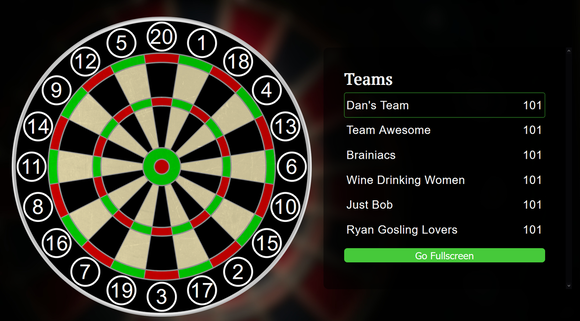 What is "Triv101 Survey-Style Trivia"? Triv101 is a web app screen game, perfect for remote meetings with trivia buffs and enthusiasts. All you need to do is to get the Zoom invites sent, get the game going, and share your screen. It’s really that simple. The point system works like a game of darts, starting with 101 points and aiming to get them down to zero.
All you need to play is your computer with Zoom or any other video conference feature and the game. However, if you’re the game host, you may want to put on a tie, even if it’s on top of your pj’s! Triv101 is becoming an instant hit for trivia enthusiasts. That being said, the versatility of the platform and the wide variety of topics is guaranteed to attract everyone. While the safest way to meet remains online, Triv101 is an amazing game designed to stay close with your loved ones. There’s no need for everyone turning on their webcams without knowing exactly what to say or who to talk to. Triv101 gives your friends and family a perfect excuse to get excited to spend a couple of hours in front of their computers, chatting, laughing, and bonding with each other. Triv101 is designed to be the life of your party, regardless if the party is virtual or in person. While right now most people have their parties online, you can definitely play it with your computer hooked to your tv at home or in a pub later. All you need to get started is to schedule your event on Zoom. When everyone’s connected, divide them into teams and give them names and decide how many points it will take to win the game. You can use the default of 101 points, 51 points for a shorter game, or 301 points for a longer one. Remind your teams that they’ll need to get that exact number to win, without going over. Then, simply go to the Triv101 web app to get started. be sure to check out the 1000 Question Triv101 Premium Addon. Once you start the game, you’ll become a game host, asking questions to each team individually with the help of the game. The team will have to guess the most popular answers in order so they can keep their points. You can use Zoom’s breakout rooms to help teams talk about their answers in private. If you’ve already tried the free version with 350 questions, you’ll know just how fun and easy the game can be. That’s why, for just one month, we’ll be giving the premium package, packed with 1350 questions, for half the price! Use coupon code TRIV2021 to get a 50% off the premium version, today. (valid until April 15th, 2021)
0 Comments
The world is shifting towards virtual events, thanks to the pandemic. Events like a birthday party have now gone virtual. Visiting your favourite bar for trivia night is no more an option, thanks to COVID-19 still lurking around the corner. One trend that has taken over during the lockdown is trivia via the wonders of modern technology. Friends and family have used technology to keep each other entertained, and also, engage each other in some friendly competition. We at Fat City Entertainment have come up with an easy and a simple way of conducting a trivia party. Triv101, which is our newest trivia game, is also perfect for video conferences. Here is a list of some awesome ideas for a starting number that fits your theme, while also having a great time! 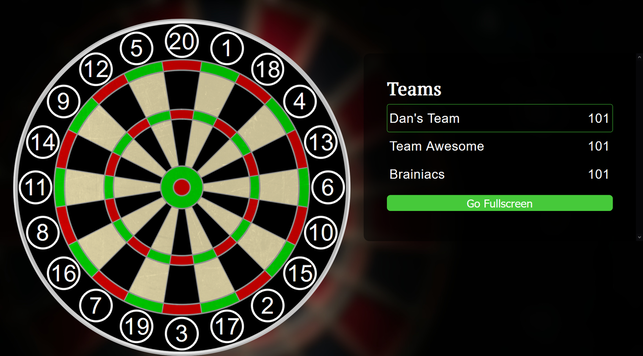
There you have it! These are some of the best ways to change the number of Triv101 to whatever you like and it also ensures that the participants have a great time, especially during these distressing times where people are being isolated from their loved ones. Triv101 can also be used in classrooms to ensure that students remember certain details in a fun and interesting manner, which kids certainly love! For people who want more of a challenge, there is also an infinite mode. It makes the game more difficult by removing the chosen question number from the board each turn. Hopefully, these ideas help you have an amazing Trivia party! The first thing you are going to want to do when planning your video conference event online is ask yourself the following questions:
Once you have answered most, if not all, of these questions, you can start to pick games that will be well-suited for your event.  Step 1: Setting a dateFor myself, as an event entertainer, an event does not begin to materialize until a date is inked in. While it is sometimes possible to alter the date down the road, I would never recommend it. Try to choose the correct date, nice and early. Do your homework too. See what else is might overlap with your start time. Ask your guests if that is a good date or not. See if people might be away on holidays, or if the Academy Awards are that night. One of the great things about virtual events is, people do not need to add travel time to attend the event, and events tend to only last 1 hour. 2 hours would be a fairly long event. Compared to an in-person holiday party, the input time required from participants is much lower. I know we'd all prefer to be there for the open bar, but we must take our positives where we can! Step 2: How many people will be signing in to the event?While this doesn't need to be an exact number right away, this is maybe the most important question to ask when choosing what games to select for your group. We have 3 main choices to decide upon when hiring us as your Virtual Event Hosts. The first is the most popular right now, "Music Bingo". One of the great things about music bingo is there really is no limit as to how many people can play at once. WE can generate randomized bingo cards for as many as we require! What we do is, pack all the games into a Google Drive folder and send the link out with the meeting link for Zoom, Microsoft Teams, or Google Meet. Then we use a tool, such as, PDFSAM to split each pdf file into individual parts. You are going to want to make a numbered list of all your guests for the event, and share this list. That will let each player know which bingo card sheet is theirs, and to download it. Then you shouldn't have anyone accidentally using the same cards. It also provides a handy list for reference to see if they are a winner when they call a Bingo! If you send the link to all the cards out early enough, players will have time to print the cards out to play along (print Landscape on regular 8.5x11 letter size paper for best results). Players can also play along on their devices using the free software Adobe Reader, or similar. The second game we offer is Triv101 - "Survey Style" trivia. This is team game, and the game will permit up to 24 teams. However, this would make for a very long game, and, in my opinion, it is much more fun with less teams, but more players per team. Input your team names before the game, and away you go. The third option we have is called Fat Bottom Trivia "Game Show". This is similar to Jeopardy-style questions and game board. But there are hidden side-games and final challenge. For this game, your host will download the Powerpoint file and select "Screen share" on the presentation when it is open. You will want to check the box for "computer audio", so you will get all the soundfx, and keep track of the team scores on a separate piece of paper. Step 3: Choosing your video conference platform.I always tell the event planners, is your group is already comfortable using one platform, go with that. It is much easier for the host to transition to another platform, than trying to teach all your guests to sign in to something new. If you are already using Microsoft Teams or possibly Google Meet for your needs, definitely go with that. Otherwise, Zoom has great features for your host and guest's needs. Customized backgrounds are a nice addition, and if you have a larger group, you can create "breakout rooms", if you want to have a place for your teams to deliberate. Though I think it is more fun for them to do that in front of the other teams. Step 4: How long do you want the event to last? I think the sweet spot for a video call is an hour long. Asking more than an hour of anyone will start to get them antsy by the end of it, and you may have people starting to leave the call early. With the exception of Music Bingo, you can probably say that, the more people, the longer it will take to complete one round. Music Bingo is a fairly passive and casual game, so other than having the host talk and the music playing. There is no requirements for the players to talk, unless they are calling Bingo! So they are free to socialize and it shouldn't drag the event out. You can play a music bingo game longer or shorter by playing more or less of each song. You can also speed up a game by making easier Bingos! For instance, "1st Line Any Direction" is easier to get and faster than "4 Corners". There are many different ways to customize the music bingo games. But I suggest 2-3 games in an hour long event. Check out all our Music Bingo Game Option Here. For Triv101, the more teams, the longer it will go. Same for Fat Bottom Trivia. So you will want to prepare beforehand a target score that will suit your time length desire. If you need specific answers from experienced hosts, please reach out on our Contact page. Step 5: Choose games that your demographic will enjoy Take a general poll of your guests age and gender, as well as location/nationality. Try to choose games that they will be knowledgeable on. If it is too difficult for them, or doesn't match up with them culturally, they may not enjoy the game as much. Again, if you require specific suggestions from experienced hosts, please reach out on our Contact page. Step 6: PrizesWhile prizes are not necessary, they can add some excitement to the game. It is best to decide how much you would like to give away first, then spread it out accordingly to the games you've chosen.
For Music Bingo, you can have multiple winners per game. Or just the one. For instance, if you are playing "Food Fight" you can say the first 3 lines any direction is a winner, then the first Blackout! So 4 prizes that game. For Triv101 and Fat Bottom Trivia, those are Team Games based on score. So you will want to have a prize or prizes that splits up nicely among the winning team. Don't overthink it, and don't try to do too much. Simple Gift Certificates will work well, and easily be shared via an email link or code. If you have more questions about Virtual Events on Zoom, please add a comment below, or email us at questions@fatcityentertainment.com Take care, and thank you for supporting live entertainment. It's is that time of the year again! But 2020 is admittedly not like anything we've seen in the recent past. That doesn't mean we quit, however. It means we adapt and overcome. Many of us have been forced to work from home, and whether we are enjoying that change or not, I think we can all agree that we would be disappointed to not have the opportunity to have a staff holiday function. Here at FatCityEntertainment.com we have had to make many changes, as well. As you can imagine, the amount of event entertainment services the world has required has reduced dramatically. Though, when one door closes, you sneak out the bathroom window... or however the saying goes. lol.  We are proud to state that we now offer complete Virtual Event Packages any time of year, and naturally, during the holidays too. As is our ritual, we like to offer an "Early-Bird Special" for early bookings of 15% off any custom Virtual Event packages. Because of the confusion among 2020 in general, we are going to extend this offer until the end of October, when you speak to an agent from our Contact Page, be sure to request your discount.
We will also be giving a 25% discount to any Trivia and Music Bingo game downloads from our Holidays Category at the Trivia Store. There are now 35 different Music Bingo Games available, and many Trivia Presentations too. Be sure to check out the Halloween Party Pack and the Christmas Party Pack. Each of which come with a free copy of "The Host Handbook: How To Start A Successful Trivia Night". Since Virtual Events are such a new solution, we do not have much in the ways of video footage at our disposal to share with you, and to other event planners. So, if you are willing, we would like to offer you an additional 10% off, if you would allow us to use video from your virtual event to share on our commercial media avenues, such as here on FatCityEntertainment.com. If you do not wish to share your company event video, no worries. Of course we will respect your privacy. Just as we prove to you each day we refuse to sell your information, and limited our email marketing campaigns to once a month or less. We hope these small gestures bring you some solace this crazy year, and we hope we still get to see your pretty faces, even if it is online using one of our many video conferencing applications, such as Zoom, Google Meet, Microsoft Teams, or even Facebook Live, Youtube, Reddit Broadcasting, or Twitch. Have an excellent Halloween, everyone! Please wear your masks (unless you are home on your video calls, because then I want to see your fantastic smiles), and stay safe! |