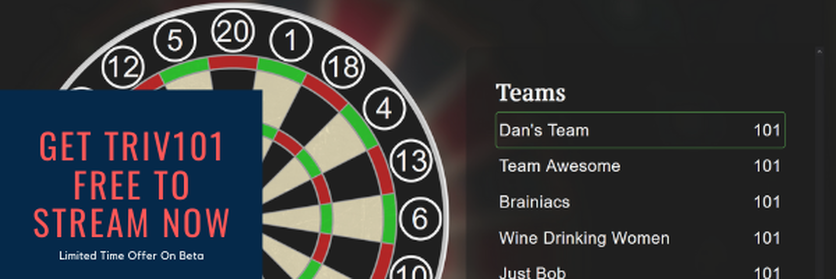
 By Danielle Bradshaw - May 19, 2020 There's no denying that there's just something amazing about the idea of trying out a new game. Be it a video game, a tabletop game, a board game, or in this case a web app screen game; there's just something that really makes us want to give it a go. It's the ultimate trivia game for both trivia hosts and trivia enthusiasts alike and down below is a basic blow-by-blow account as to why that is. In a nutshell, there' a lot that makes this the ultimate trivia game, but don't worry, we'll start slow. To begin with, the game has an incredible amount of versatility. As previously stated, it's a web app screen game which essentially means it's a downloadable app that you can keep on your desktop or laptop to play whenever you want. What Makes Triv101 the "Ultimate Trivia Game"? The very nature of the game makes is really easy to share and play among friends and family. If you want to put the game on a larger screen - like your TV - you totally can. All you've got to do is connect your television to your computer with an HDMI cable and, voila! Everyone's got a picture-perfect view. If you want to flex your extraordinary trivia know-how for everyone to see, stream it on Twitch. Everyone and their grandmother use the streaming platform to show their skills and for Let's Plays, there's no reason why you couldn't do the same with Triv101. YouTube would work much the same way; stream yourselves (you, your friends, and family) having a good time showing off your smarts. You can just keep it simple and play each over Zoom as a fun way to keep in touch. Triv101 can be used in various ways but arguably the best trait of the game is the ability to be shared, displayed by, and played by multiple people at once. Triv101 is A Great Way to Cut Loose and Have Fun Anywhere This is technically still a point toward Triv101's versatility, but it's important enough to get its own section in this article. The point being, that you can play Triv101 pretty much anywhere. Part of the reason why is because it's actually a really simple game. There is a free version of the game and a premium version. Each version has 350 and 1350 questions respectively.
The trivia enthusiasts out there will definitely be pleased by that amount of questions to try their hand at. You and your friends and family can create teams to compete against each other and show off what you know. The relatively streamlined design of the game makes it easy to learn and lends to its "ultimate play-ability". You can play it in pubs, at parties, it's excellent for team-building exercises, and yes, you can play it at home while social distancing. Needless to say, it's quite a bit different from the trivia games that people download onto their phones. There are so many ways to share and play Triv101 that it's in a breed all their own. Like any good game, there's more than just a single reason why anyone should play Triv101, really. One good motive, though, is so that you can stay in contact with distant loved ones. Right now, it's more important than ever to stay connected with friends and family during this time. It can serve as a terrific means of expanding your knowledge too. Some of the facts may be totally random, sure, but if you're a true trivia aficionado, that's a definite plus. Triv101 is an outstanding way to kill time too, a boring Friday night can go by in a flash answering question after question. There is really no wrong way to share or play Triv101, which is why it's such a good time. The versatility makes it plenty of fun. The sheer amount of questions and the portability ensures that you'll get plenty of variety when playing. Triv101 offers a truckload of entertainment and can keep a large group busy for a long time. You can grab some beers, snatch up some snacks, and settle in for a long night winning (or losing) while trying your hand at some trivia. Triv101 is a different kind of trivia game and those differences really make it stand out from the rest.
0 Comments
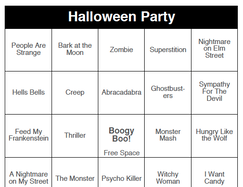 You might not be surprised, but the most popular option for your party games this year is also the easiest... "Halloween Party" Music dobOFF. After purchase and downloading the document to your desktop, print off as many sheets as you require for your guests at the party. The document can print up to 60 (Edit: now every game comes with 250 randomised card per pack). randomized cards at a time, if you have more than 60 guests that you'd like to play in a round, just ask for a larger quantity, and a Fat City representative will generate one for you exactly how many you require. This is included in the price. Each page is set to "Landscape" layout, with 2 bingo cards per letter-sized sheet. You can always cut the sheet in two pieces with a pair of scissors or a paper cutter to split into individual sheets. Some hosts prefer to give guests 2 cards at a time. We always recommend handing out Bingo Dobbers such as these: https://www.amazon.com/DAB-INK-3oz-Bingo-Daubers/dp/B01C4QBW3G Printing on bright colored paper is always a bonus. I think the 60lb cardstock may be the best: https://www.amazon.com/Neenah-80944-01-Astrobrights-Colored-Cardstock/dp/B01LX0UJBN Don't forget to follow the playlist: Spotify - Amazon Prime - Apple Music Hit "shuffle" or make your own DJ order in the Queue. Bring lots of Halloween themed prizes and some good energy. Maybe try an "H" for a bingo somewhere along the way. There you go. You're all set! Powerpoint Halloween Themed Trivia Presentation After purchase and download of Fat Bottom Trivia "Halloween Party", you will need to connect to a big screen. Use an HDMI cable or wireless connection as described above.
Open the powerpoint file (you will need to have installed Microsoft Powerpoint or an equivalent presentation program. Use "presenter mode" so you can see any host notes, as well as seeing the next screen during the presentation. This will allow you or your host to know and check the answers from the crowd. Be prepared for hidden side-games to appear. Allow teams that answered correctly last round to choose the next category. Make sure to keep track of points on a sheet of paper. And promote having fun, and bonus points for dancing and singing along. Try a mini-challenge for the best "Team Cheer" or "Funniest Team Name". Game Buzzers are also a helpful addition: https://www.amazon.com/Learning-Resources-Lights-Buzzers-Classroom/dp/B00B2FNHB6
Written by: Dusty Ramsbottom - September 2, 2019
Can you believe it's September already?! I hope you had a great summer, I know I did. I feel like I should be hitting-the-ground-running this Fall a little more than I already am, but now is as good a time as any to begin! So, as motivation for myself (and hopefully for you too) I wanted to make this quick list of possible events to get the creative juices flowing. We, as entertainment managers and producers, are required to "bring the energy" every time we grab a microphone. This year will be no different, and here's some ideas to get ready. 
1. Host An "End Of Summer" Party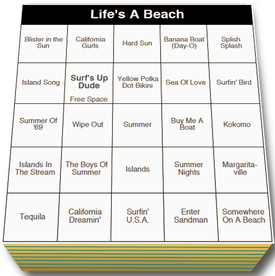
The actual last day of Summer is September 23rd this year, but I'd say anytime from now until the end of the month will be fitting for an End of Summer party. This is a casual affair that doesn't require over-the-top decorations to succeed. A couple low burning tiki torches would be nice, but cool beverages and solid tunes will suffice.
Games to play: a) Golden Oldies - Music Bingo A classic for all audiences. Elvis Presley, Ritchie Valens, etc. If you are expecting kids, you can get a similar feel from the "Body Parts" music bingo game, that they will be more inclined to appreciate. b) Life's A Beach - Music Bingo Casual, and a little "twangy" this game encompasses the mellow feel of the beach, a summer well-enjoyed, and a general relaxation. c) The 90s or Hair Bands - This choice kind of depends on the crowd you expect. If you expect generally 30-somethings, I recommend The 90s to really get the mood going later in the evening. Hair bands is a better mix of eras for a more diverse crowd. 2. A New "Happy Hour" Show, Featuring Triv101
Our newest addition this Fall will be Triv101, a "darts" like, survey-style trivia game made specifically for Trivia Hosts who enjoy simply printing off the Q & A and Answer Sheets for their shows. After that, all you need is a mic (or a hearty bellow), and you are ready to go. Each round has 10 Questions and a Bonus. The team who scores closest to 101 wins the round.
Watch for this game in the Trivia Store. 3. Get Excited For Your Halloween Party
4. Video Game Trivia Night
This 3-pack of games is sure to have the most gamer enthusiasts entertained. Have a winner for each game, or bring back your highest scoring teams for a Final Tournament edition.
There are also Video Game bingo cards, that would be a great warm-up. Name that theme! 5. Have A Mega-Happy Christmas Party "Game Show"!
Whether you'd like one of our hilarious game show hosts to come to you with full Audio / Visual setup, dance lights, and mojo.. or if you prefer to save money this Christmas and host the event yourself, you will enjoy the interactive games we've created. This game is specifically designed to get people on their feet and mingling about. Check out the new-and improved Xmas game in the Trivia Store or Contact Us if you are looking for a host too!
Have any questions, or a success story from one of your events?? We'd love to hear about it in the comment section below. Written By Dusty Ramsbottom, August 18th, 2019 I used to spend hours writing my trivia shows each week. That was back in 2002. Holy moly! It was a Sunday night weekly at Rock Bottom Pub in Windsor, Ontario. Last time I checked, that show was still going!! Obviously, the baton has been passed forth several times since then, but the energy lives on... 2002 was a simpler time, and I hope they are making a few bucks more than I was then. Especially, considering how long it can actually take to create an interactive experience, with just the right difficulty of trivia questions, and ready for a keen host to take control with. 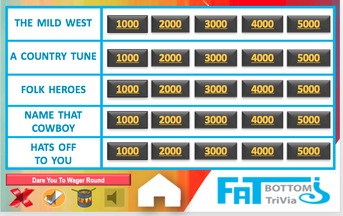 A Good Trivia Show Takes Several Hours To Write. Is It Worth The Time When You Can Purchase Pro Made Games For $15?Since then, I've kept everything I ever wrote, and those trivia notes have slowly evolved over the years. One day it occurred to me that others would appreciate the work I've put in. I then created Fat Bottom Trivia in Powerpoint format, with notes ready on hand to give to other hosts. Here's what You'll Need: 1. A computer or tablet with Microsoft Powerpoint installed. This is included with the Microsoft Office package. Or, you can find an alternative to Powerpoint, though we can't be certain all the functions will work as they should. Some animations or transitions could be affected. Be sure to test any other options out well before your show. Check out https://alternativeto.net/ for recommendations by users. 2. A connection to a TV or projector. 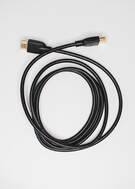 HDMI is our #1 friend, nowadays. Inexpensive and reliable. But you may want to think about wireless options such as Apple Airplay, Chromecast, or Roku, depending on your device model. 3. Download fun trivia games from the Trivia Store After purchase click the download link in the webpage or email. Click each file you've purchased, and download to your desktop. 4. If your "presenter mode" was turned off, turn it back on to be able to see the next slide, and tips for hosts in the Notes section.  5. Click "Read Only":  6. Go completely through each slide before your show to avoid any surprises, such as locating the "Hidden Side-Games" 7. Use arrow keys or swipe to advance through slides. 8. Clicking on the "Home Screen" and "Question Value". 9. Test The Sound FX. (Right one "mutes")  Have fun with your guests, this is the whole point! Make up Bonus Point opportunities by playing fun music alongside, inviting people to sing and dance, or for extra knowledge.
Every show is different, based on the host, the venue, and the crowd. Bust the Questions & Answers are "Tried & True". If you have an idea to go with the games, it's probably a good one. Go for it! I mean, Just Doo It™.. Haha! Good luck out there, hosts. Break a leg! |